
Why Businesses Need a Quick Setup Company Store to Solve Merchandise Chaos
To launch a quick setup company store efficiently, businesses follow a structured workflow: define the program scope, curate a concise catalog of core merchandise, upload approved vector brand assets, configure decoration standards, set user roles and budget limits, and complete end-to-end test orders. This rapid approach eliminates manual logistics friction while securing brand consistency across every department.
When corporate merchandise distribution is decentralized, operations quickly break down. Department heads buy from random internet vendors, managers run rogue expense reports, and brand logos get stretched or embroidered in the wrong colors. Most growing organizations realize they need to stop the swag chaos with an online company store when the administrative burden of coordinating simple gear orders begins pulling high-value team members away from their actual jobs.
A centralized purchasing portal solves these problems by providing:
- Strict Brand Governance: Approved colorways, exact vector logos, and standardized decoration techniques across all departments.
- Controlled Corporate Spending: Hard budget limits, department billing codes, and automated approval workflows that prevent runaway costs.
- Frictionless Distribution: Automated direct-to-door shipping for distributed, hybrid, and multi-location branch teams.
- Single Sign-On (SSO) Security: Seamless enterprise authentication to ensure only authorized personnel access internal inventory.
Eliminating Spreadsheet Tracking and Admin Overhead
Manual order collection is an operational sinkhole. Managing sizes, colors, and shipping addresses inside shared spreadsheets almost always leads to misplaced orders, delayed onboarding gifts, and frustrated team members. Learning how to launch an online company store without losing your mind comes down to replacing those manual touchpoints with automated order routing.
When a team member orders through a dedicated store, the platform captures sizing preferences, validates the delivery address, and applies internal spending allowances automatically. HR and operations teams no longer need to play logistics coordinator or manually reconcile dozens of one-off credit card receipts.
Evaluating On-Demand vs. Stocked Inventory for a Quick Setup Company Store
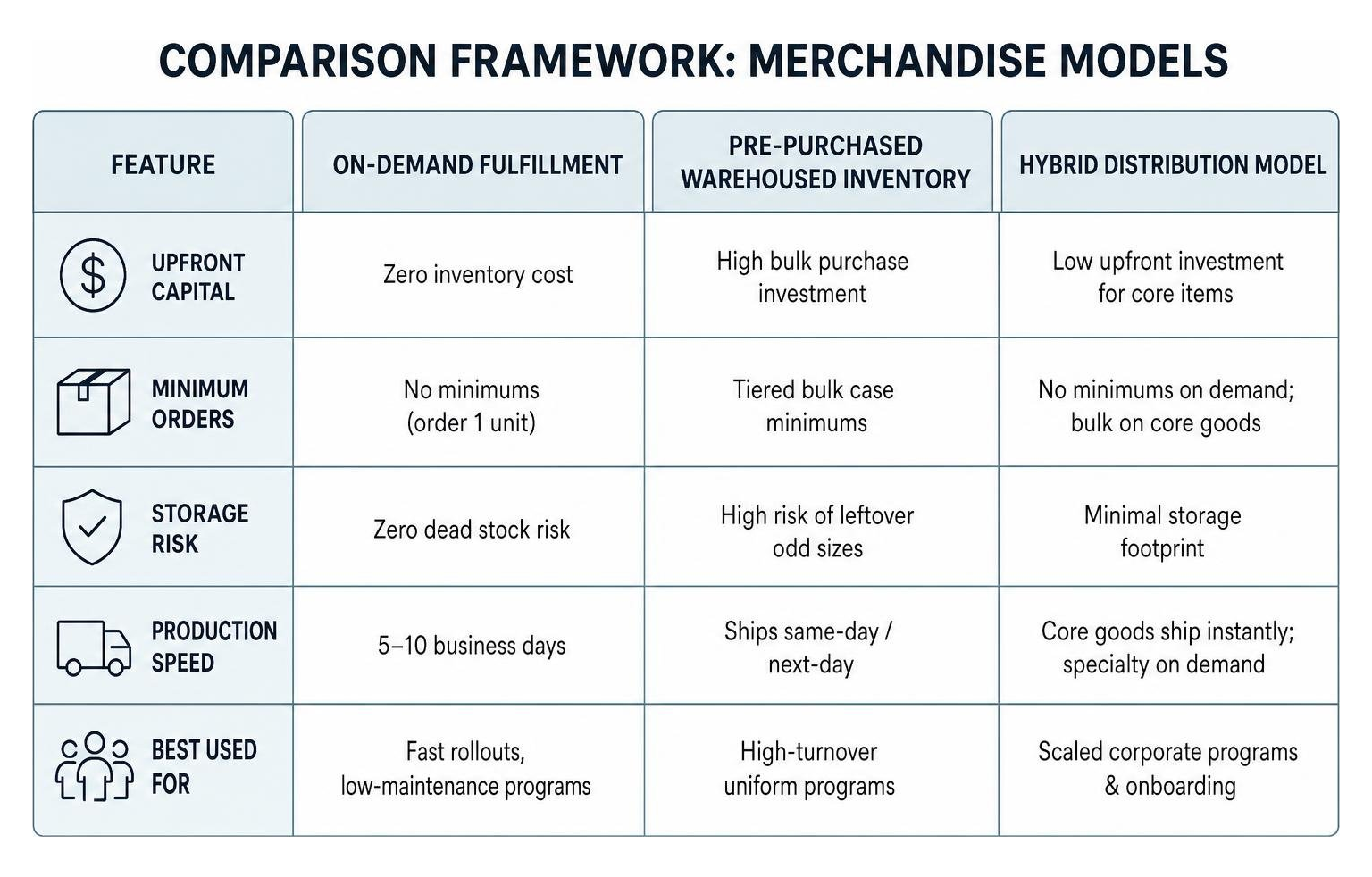
One of the first structural decisions is choosing how your inventory will be produced and fulfilled. Many companies assume they must purchase thousands of units upfront, only to find their office storage closets overflowing with unpopular sizes. Reviewing an ultimate checklist for online company store vs bulk ordering helps clarify whether on-demand production or pre-purchased inventory best matches your organization's cash flow and velocity.
| Feature | On-Demand Fulfillment | Pre-Purchased Warehoused Inventory | Hybrid Distribution Model |
|---|---|---|---|
| Upfront Capital | Zero inventory cost | High bulk purchase investment | Low upfront investment for core items |
| Minimum Orders | No minimums (order 1 unit) | Tiered bulk case minimums | No minimums on demand; bulk on core goods |
| Storage Risk | Zero dead stock risk | High risk of leftover odd sizes | Minimal storage footprint |
| Production Speed | 5–10 business days | Ships same-day / next-day | Core goods ship instantly; specialty on demand |
| Best Used For | Fast rollouts, low-maintenance programs | High-turnover uniform programs | Scaled corporate programs & onboarding |
Relying on bulk orders without an inventory strategy often turns spare rooms into makeshift supply closets, which can easily feel as chaotic as managing portable residential storage units just to store corporate apparel. A modern on-demand or hybrid approach eliminates that overhead entirely.
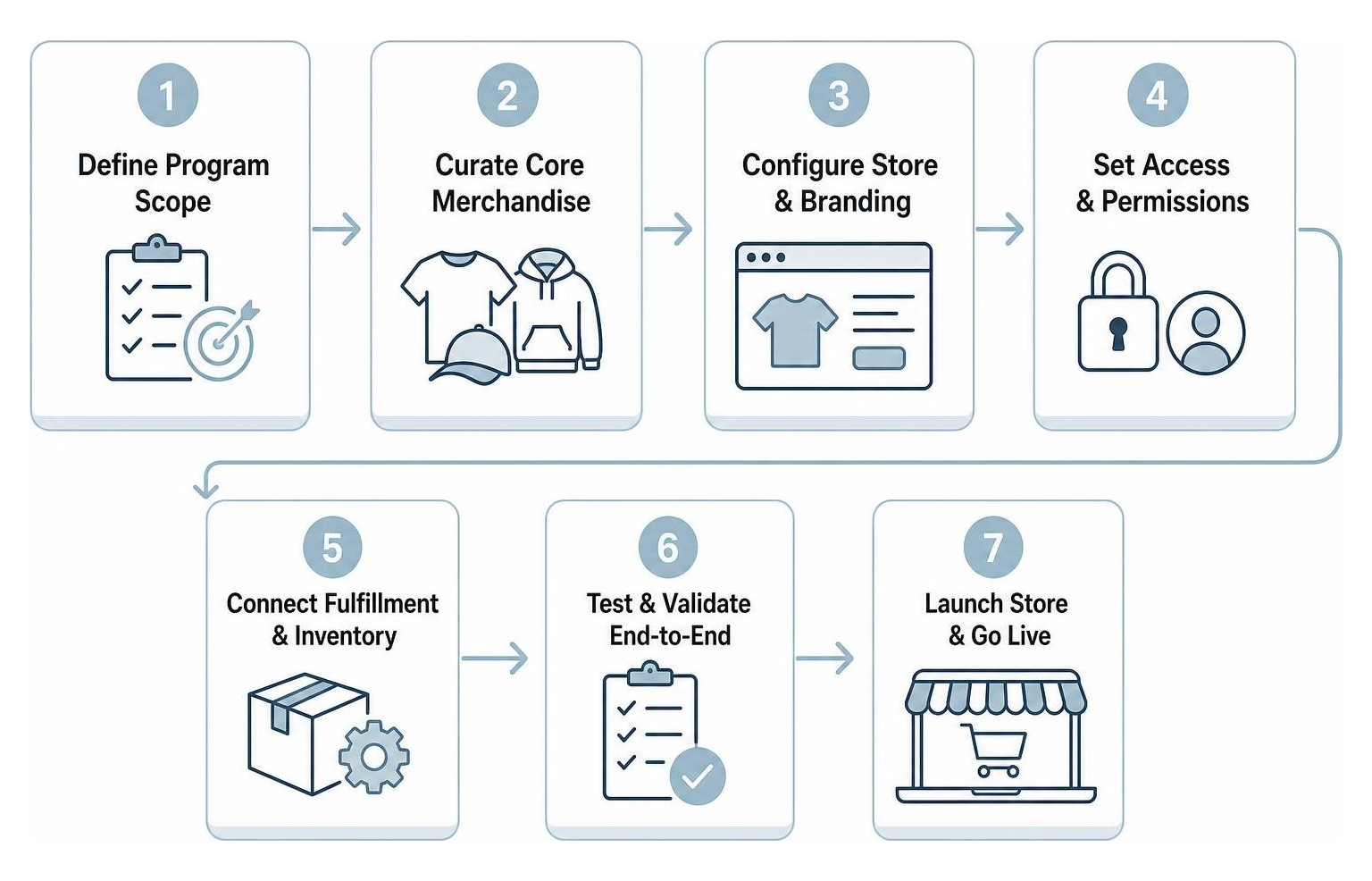
The 7-Step Implementation Roadmap to Launch in Days, Not Months
A rapid deployment does not require cutting corners on quality or brand integrity. By following a structured implementation sequence, businesses can move from concept to a live storefront in just a few days. Following an essential guide to online company store for employees ensures your roll-out covers every critical operational checkpoint.
Step 1 & 2: Define Program Scope and Curate Core Merchandise
The fastest way to stall a store launch is offering too many items right away. A bloated catalog creates decision fatigue for buyers and adds unnecessary setup steps.
- Define the Primary Goal: Determine whether this store is built for internal employee onboarding, uniform distribution, sales enablement, or milestone recognition.
- Curate a Tight Catalog: Launch with 6 to 12 high-utility, core items. Investing in high-quality custom apparel curated stores ensures your team receives premium, durable merchandise they will actually use and appreciate.
Step 3 & 4: Upload Approved Brand Assets and Configure Product Decoration
Brand integrity depends on precise execution during the decoration setup phase. To avoid blurry prints or mismatched thread colors:
- Provide High-Resolution Vector Artwork: Supply master .EPS, .AI, or .PDF vector files to ensure crisp rendering at any scale.
- Lock In Color Profiles: Specify exact Pantone Matching System (PMS) color codes so that corporate palettes render consistently across different materials.
- Establish Decoration Profiles: Set up master embroidery stitch files and precise print placements. Learning the expert way to handle b2b company store setup without the stress involves digitizing your logo correctly from day one so every production run meets artisan-level standards.
Step 5 & 6: Set User Permissions, Budgets, and Payment Workflows
Your store must support how your business handles accounting and approvals:
- Configure User Roles: Segment access so internal staff see employee-specific gear while regional branch managers can access bulk event materials.
- Establish Payment Options: Implement flexible checkout mechanisms, including employee stipend allowances, points-based redemption, department purchase orders (PO), or credit card processing.
- Set Up Approval Workflows: Establish budget caps and automatic manager approvals for large orders to maintain complete spend visibility while keeping the store PCI-compliant.
Step 7: Conduct Pre-Launch UX Testing and Employee Rollout
Before announcing the store to your entire organization:
- Execute Beta Test Orders: Place end-to-end test orders to verify checkout workflows, discount voucher codes, and automated confirmation emails.
- Review Signage and Presentation: For physical facilities, clear corporate presentation matters just as much as digital design, much like working with FASTSIGNS® of Nassau County - Garden City/West Hempstead, NY to maintain consistent workplace visual standards.
- Launch Internally: Distribute the store link via email with direct points-claim links or onboarding welcome credits to drive immediate engagement.
Technical Architecture and Financial Considerations for Rapid Deployment
Understanding the mechanics behind store platforms helps you pick the right long-term partner and avoid hidden maintenance fees. Evaluating software capabilities requires knowing how to evaluate online company store platforms for your business across usability, integration, and total cost of ownership.
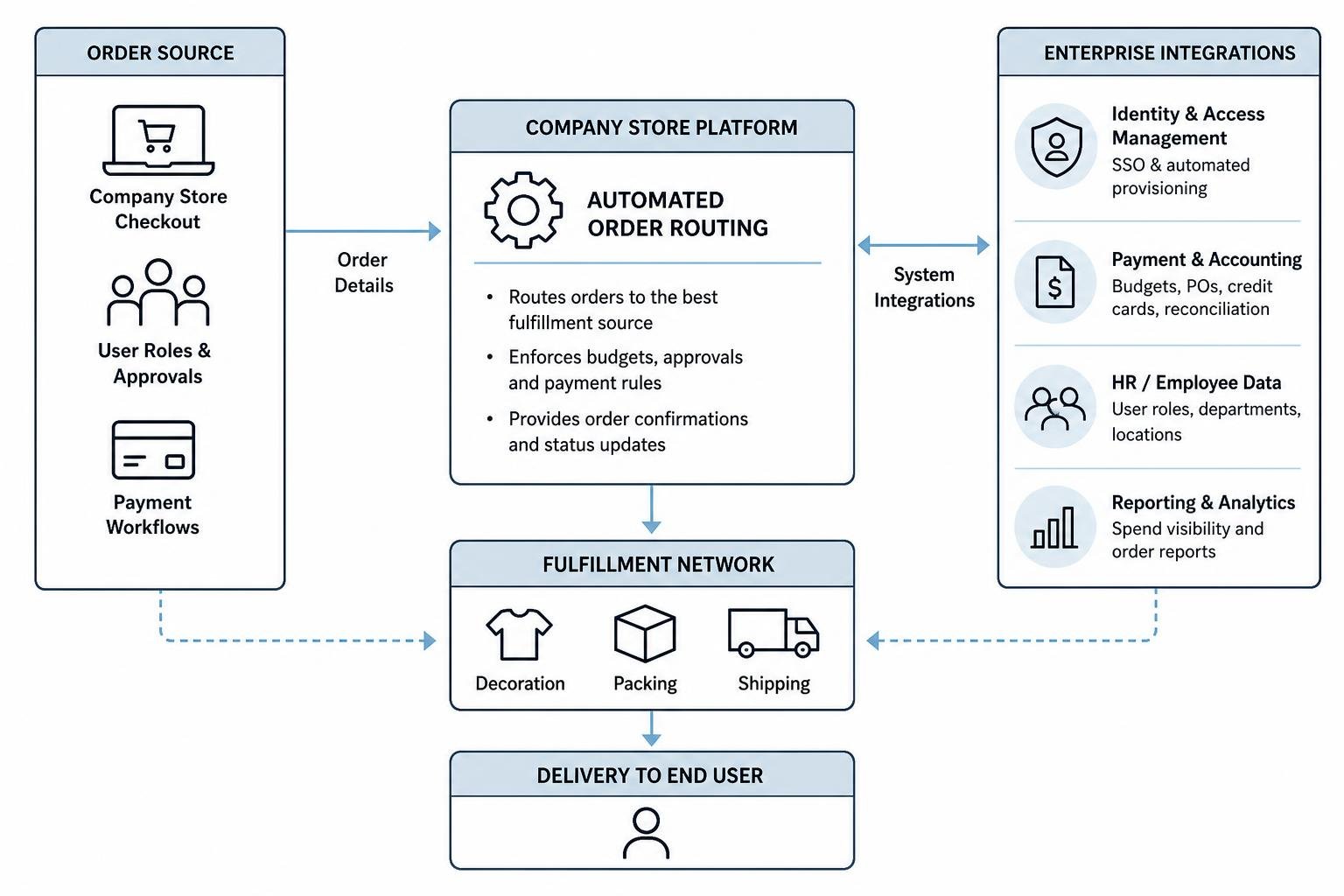
Key Platform Integrations and Architecture for a Quick Setup Company Store
Modern company store platforms should connect directly with your core business systems. Consulting a comprehensive guide to company online store architecture reveals the three primary technical layers:
- Identity & Access Management: Direct integration with Okta, Azure AD, or Google Workspace via Single Sign-On (SSO) for automated employee provisioning.
- Logistics & Automated Routing: Automated shipping integrations that validate residential and commercial addresses, split multi-vendor shipments, and provide real-time tracking.
- Custom DNS & White-Labeling: Pointing a secure subdomain (e.g., store.yourcompany.com) via CNAME records to maintain brand trust during checkout.
Free Store Models vs. Managed Concierge Portals
Many generic commodity platforms advertise "free" store setups, but these options often come with significant trade-offs in decoration quality, platform fees, and customer support. Deciding is a merch store a right fit for your company? requires weighing cheap, self-service transactional tools against high-touch managed programs.
Generic print-on-demand sites frequently use entry-level commodity blanks and automated, uncalibrated digital printing that fades after a few washes. In contrast, a managed concierge partner delivers artisan embroidery, strict quality assurance, custom packaging, and dedicated account support that protects your brand equity as you scale.
Frequently Asked Questions About Setting Up a Company Store
How quickly can an online company store go live?
If your branding assets, vector logos, and product catalog are pre-selected, a custom on-demand store can go live in as fast as 2 business days. Full-scale enterprise programs featuring custom domain configurations, SSO integrations, and extensive uniform catalogs typically take 2 to 4 weeks.
Do we need to hold physical inventory or meet minimum order quantities?
No. Modern on-demand company stores allow employees to order single items on demand without any upfront inventory holding or minimum order quantities (MOQs). Organizations can also use a hybrid approach, keeping bulk stock for high-turnover items while producing specialized apparel on demand.
How should companies manage employee purchasing and store budgets?
Most organizations manage budgets through digital voucher codes, quarterly stipend allowances, or points-as-currency systems. Platform rules can also enforce department purchase orders (PO) with automated manager approval thresholds for orders exceeding specific spending limits.
Conclusion
Managing a growing company's apparel and merchandise program should not mean spending your week chasing size spreadsheets, approving random expense reports, or worrying about off-brand logos. A well-designed company store centralizes your procurement, automates direct-to-door distribution, and ensures every item delivered to your team reflects your brand standards.
At Apparel Boss, we help organizations eliminate merchandise chaos through our managed Apparel Boss concierge company stores. By combining high-end decoration with dedicated program management, we make launching and running your corporate store completely seamless. Explore our custom kitting services and full suite of corporate merchandise services to give your team an effortless ordering experience.